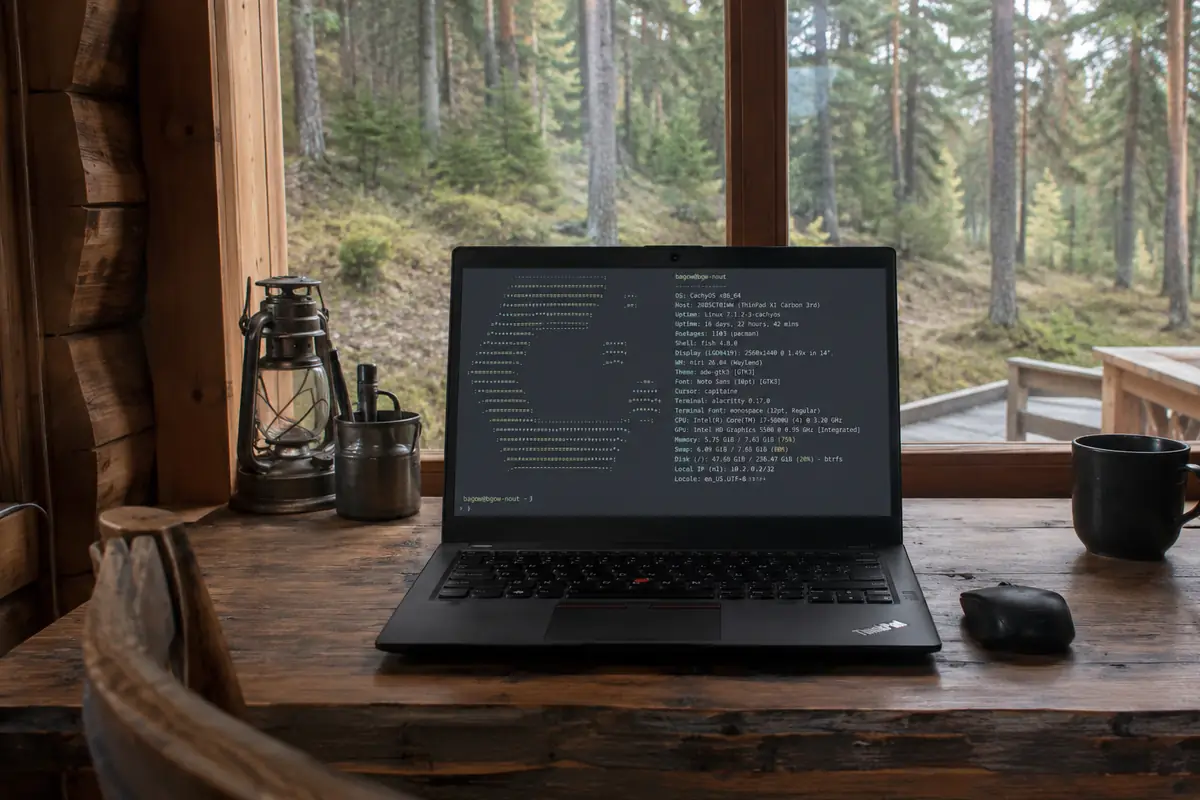
CachyOS + Niri on ThinkPad
My Linux Setup in 2026: CachyOS + Niri
Over the past few years, I have tried a huge number of distributions, window managers, and desktop combinations. Debian, Ubuntu, Arch, i3, Sway, KDE, X11-I went through all of them multiple times.
At some point, I realized that an operating system should stop being a standalone hobby. A computer should work, not constantly demand repairs after every system update.
As a result, my current setup looks like this:
- Laptop: ThinkPad X1 Carbon 3rd Gen
- CPU: Intel Core i7-5600U
- RAM: 8 GB
- Distribution: CachyOS
- WM: Niri (Wayland)
- Shell: Fish
- Terminal: Alacritty
- File System: Btrfs
Why CachyOS
To be honest, at first I was quite skeptical about CachyOS. Just another Arch-based distribution among dozens released every year.
However, after several months of daily use, my opinion completely changed.
It is one of the few distributions that actually feels noticeably faster than vanilla Arch.
- Excellent kernel optimizations out of the box.
- Optimized CPU instruction package builds.
- Well-tuned CPU schedulers.
- Flawless support for modern hardware.
- Zero bloat.
At the same time, all advantages of Arch remain intact:
- cutting-edge software packages;
- the AUR;
- extensive documentation;
- predictable system layout.
Why Niri Was a True Revelation
For many years I used i3, then Sway.
After switching to Niri, I simply don't want to go back.
Niri arranges windows in columns on a horizontally scrolling strip within each workspace. It also has dynamic workspaces arranged vertically; the scrolling strip does not replace them.
Conceptually it works like this:
← Browser ← Docs ← IDE ← Terminals ← Monitoring →
You no longer need to remember:
- which workspace has your browser;
- where your IDE is located;
- where the log terminal went.
Everything exists on a continuous workspace and moves intuitively.
For a developer, this workflow feels incredible.
Wayland Is Finally Ready for Daily Production
A few years ago, I wouldn't have recommended Wayland as a primary workstation driver.
Today the situation is completely different.
Everything works without a hitch:
- browsers;
- PipeWire audio;
- screen capture & screenshots;
- HiDPI scaling;
- remote desktop access;
- OBS and various development tools.
Over the last few weeks, I haven't experienced a single display server crash.
Performance on Vintage Hardware
The most impressive part is that all of this runs smoothly on a 2015 laptop.
- Uptime: almost 17 days
- Over 1,100 installed packages
- Heavy daily workload
- Smooth performance even under load
The system remains ultra-responsive even with multiple browser instances, IDEs, dozens of terminal sessions, Docker containers, and local LLMs open simultaneously.
Compared to modern desktop environments that consume gigabytes of RAM right after boot, this is extremely refreshing.
What I Love Most
1. Predictability
After system updates, everything keeps working smoothly. That's a surprisingly rare quality in modern Linux.
2. Speed
There is virtually zero input latency between keystrokes and UI responsiveness.
3. Minimalism
You don't feel like the computer belongs to the distro. It is strictly your tool.
Drawbacks
No system is perfect.
- Niri is still relatively young.
- Sometimes you need to tweak config files manually.
- A few legacy X11 apps still struggle under Wayland.
Conclusions
After more than twenty years with Linux, I reached a simple conclusion:
A great operating system isn't the one with the most eye candy or trendy features. A great operating system is the one you forget even exists.
When weeks pass and you realize you haven't had to fix anything, edit broken configs, or recover after a broken update-you know everything was done right.
Right now, the combination of:
ThinkPad X1 Carbon + CachyOS + Niri + Fish + Alacritty
has proven to be one of the most pleasant Linux setups I've used in years.