dimabagow

Manuals

Home server system
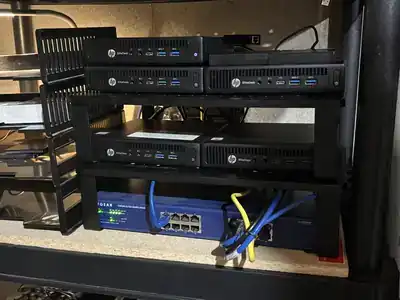
Home server system My system consists of servers completely isolated from the network (these are simply passively cooled mini PCs), I have 12 such boxes, each responsible for its own part of the system: 1. Web server 2. Security and video surveillance 3. Communications 4. Virtualization 5. Backup server 6. LLM 7. Statistics and monitoring 8. Firewall 9. Automation and smart home management 10. Server for apps working with external traffic 11. Game server 12. Private services 13. Infrastructure support systems 14. Torrent…
Sphere Ark Project
Sphere Ark Project This technical regulation represents a comprehensive engineering solution for the construction of an autonomous underground structure of increased strength, adapted to specific hydrogeological conditions. The project takes into account the deep occurrence of groundwater (10–12 meters) and the potential landslide activity of the slope, ensuring absolute safety during the lifetime of the owner and guaranteed conservation of the object on a scale of eternity. Stage 1: Stabilization of the existing building (Creation of the exoskeleton) Before starting heavy excavation work,…
Excel Cheat Sheet
Excel Cheat Sheet DescriptionFormulaEverything between brackets, i.e., all HTML code<.*> - screenshot by linkReplace line break character CHAR(10) inside cell with <br>=SUBSTITUTE(A1;CHAR(10);"<br/>")Everything after space=MID(A1;FIND(" ";A1)+1;32000)Everything before space=MID(A1;1;FIND(" ";A1)-1)Search cell content in range of cells=COUNTIF($A$1:$A$99987;B1)
Vim Cheat Sheet
Vim Cheat Sheet Vim Cheat SheetHere is my personal cheat sheet for commands in the Vim editor that I frequently use or tend to forget.Navigation & Cursor Movement:h, j, k, l — Left, down, up, rightw — Jump forward to the start of a wordb — Jump backward to the start of a word0 — Move to the start of the line$ — Move to the end of the linegg — Go to the first line of the documentG — Go to the…
50 Rules of Programming
50 Rules of Programming 50. To understand recursion, you must first understand recursion.49. There are 10 types of people in the world: those who understand binary, and those who don't.48. There are two hard things in Computer Science: cache invalidation and naming things.— Martin Fowler47. There are only two kinds of languages: the ones people complain about and the ones nobody uses.— Bjarne Stroustrup46. Simplicity is prerequisite for reliability.— Edsger W. Dijkstra45. Measuring programming progress by lines of code is like measuring aircraft building…
Learn Everything Using the Terminal
Learn Everything Using the Terminal All utilities work in terminal mode.nmon – utility with GUI interface for monitoring CPU, memory, disk i/o and other attributeshdparm -t -T /dev/sda1 – disk performancestat -f / – number of used/free blocks/inodesiostat -m -x sda 2 6 – watch load of specified disk (sysstat package)vmstat -S M 2 50 – watch resource statistics/consumptionfree -m (cache column – memory occupied by FS cache)cat /proc/meminfo – information about RAMcat /proc/cpuinfo – information about CPUcat /proc/interrupts – who generates more interruptscat /proc/net/dev…
WordPress to a New Domain
WordPress to a New Domain Transferring WordPress to a New Domain Sometimes it becomes necessary to change the site domain without changing the site itself. The content remains the same, the structure of links does not change, but the address becomes different. At first glance the task looks simple, however if you do something wrong, you can lose part of the traffic, search engine positions, or get a lot of indexing problems. Conventionally, the process can be divided into two parts: Transferring WordPress to a…
Setting Up Wi-Fi in Debian
Setting Up Wi-Fi in Debian Setting Up Wi-Fi in Debian GNU/LinuxHere is a complete step-by-step guide to configuring wireless network interfaces in Debian using terminal and configuration files.
Migrating a Website from the Terminal
Migrating a Website from the Terminal When transferring a website from the terminal, first of all we enter the receiving server. Of course you can do this from local machine too, but why add an extra link... So let's begin: scp -r -l 10 -c blowfish [email protected]:/home/path/to/folder/* /home/path/to/folder/local -r - flag for copying directories /* - if you want to copy all files in directory but not the root directory itself. -l 10 - limit bandwidth speed. -c blowfish - change default cipher (AES-128) to blowfish…
Network in Debian
Network in Debian Article for those using Debian Linux on the desktop.To configure the network, disable all GUI network configuration programs. It is much easier to do everything via files and the terminal.First, you need to know what you want to configure. You should have your provider or network settings in front of you. After placing your settings in front of you, type ifconfig in the terminal. This command will show the current state of your network hardware and settings. Next, before editing…